

WiFi Recon (wifi.recon)
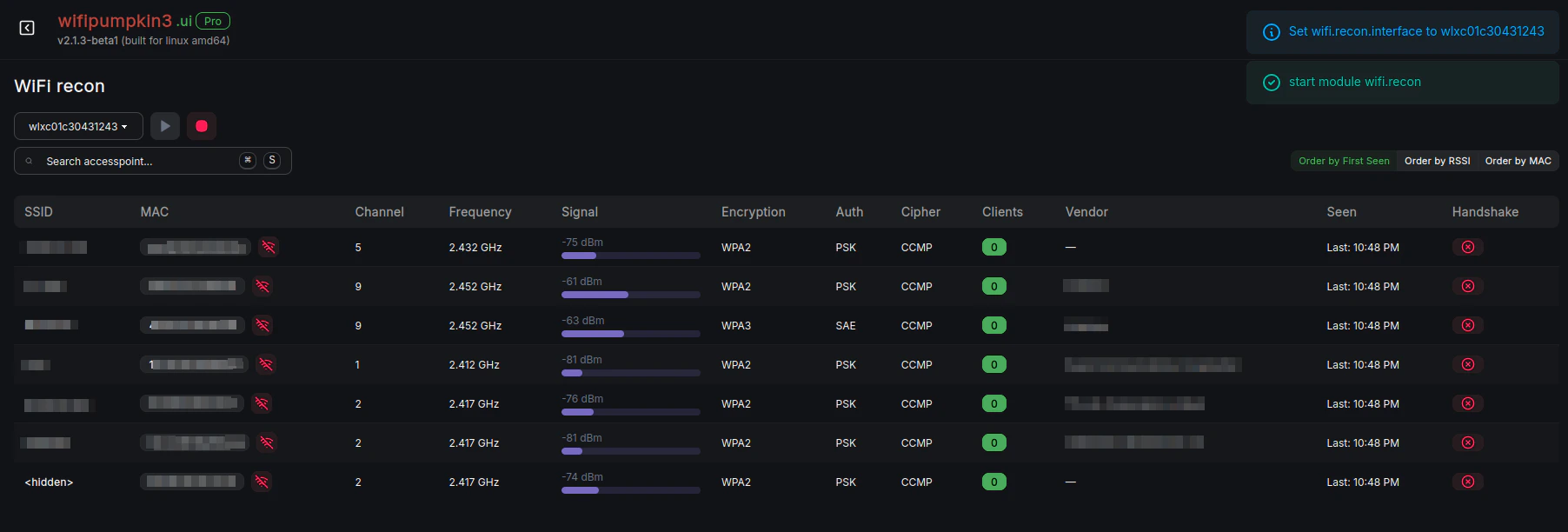
wifi.recon
wifi.recon Web UI Interface
wifi.recon module allows you to monitor wireless networks, capture information about clients, and perform 802.11 deauthentication attacks.It is designed for wireless penetration testing, auditing, and monitoring.
Module Usage
Description
- wifi.recon (not running): Monitors wireless networks and can perform deauthentication attacks.
Avaliable Commands
| Command | Description | |
|---|---|---|
wifi.recon.filter BSSID | Filter clients by BSSID for display. | |
wifi.recon.filter.clear | Clear the BSSID filter. | |
wifi.recon.show | Show the list of detected wireless stations (clients). | |
wifi.recon.clear | Clear all collected access points. | |
wifi.recon.deauth.send | Send a single 802.11 deauth frame to each client on the target BSSID. | |
| `wifi.recon.deauth on | off` | Enable or disable deauthentication mode. |
wifi.recon.deauth.add BSSID | Add a BSSID for continuous deauthentication attack. | |
wifi.recon.deauth.rm BSSID | Remove a BSSID from continuous deauthentication attack. | |
wifi.recon.deauth.list | List all BSSIDs under continuous deauth attack. | |
wifi.recon.channel CH | Set specific WiFi channels (comma-separated) or clear for hopping. |
Commands Usage
wifi.recon
- Description: Start/Stop 802.11 wireless monitor.
wifi.recon.filter
- Description: Filter clients by BSSID for display.
wifi.recon.filter.clear
- Description: Clear the BSSID filter.
wifi.recon.show
- Description: Show the list of detected wireless stations (clients).
wifi.recon.clear
- Description: Clear all collected access points.
wifi.recon.deauth.send
- Description: Send a single 802.11 deauth frame to each client on the target BSSID.
wifi.recon.deauth
- Description: Start/Stop continuous 802.11 deauth attack.
wifi.recon.deauth.add
- Description: Add a BSSID for continuous deauthentication attack.
wifi.recon.deauth.rm
- Description: Remove a BSSID from continuous deauthentication attack.
wifi.recon.deauth.list
- Description: List all BSSIDs under continuous deauth attack.
wifi.recon.channel
- Description: Set WiFi channels (comma-separated) or use clear for channel hopping.
Parameters
| Parameter | Description | Default |
|---|---|---|
wifi.recon.deauth.skip | Ignore deauth for specified BSSIDs (comma-separated). Useful to avoid specific networks. | (none) |
wifi.recon.handshakes.dir | Directory where captured WPA handshakes are stored (pcap format). | handshakes/ |
wifi.recon.hop.period | Delay (ms) per channel during WiFi scanning. Doubled for dual-band scanning. | 250 |
wifi.recon.interface | Interface name to use for scanning. | (default iface) |
wifi.recon.region | Wireless regulatory domain to apply before enabling interface. | (none) |
wifi.recon.rssi.min | Minimum WiFi signal strength in dBm to consider. | -200 |
wifi.recon.show.manufacturer | Display device vendor info based on MAC address prefix. | false |
wifi.recon.txpower | Adjust transmit power (dBm) before initializing the WiFi interface. | 20 |
Parameters Usage
wifi.recon.deauth.skip
- Description: Skip deauth for specific networks (BSSIDs)
wifi.recon.handshakes.dir
- Description: Change default directory for WPA handshake storage
wifi.recon.hop.period
- Description: Adjust channel hopping speed (500ms per channel)
wifi.recon.interface
- Description: Specify alternative WiFi interface (e.g. wlan1)
wifi.recon.region
- Description: Set regulatory domain (e.g. United States)
wifi.recon.rssi.min
- Description: Only show networks with signal above -70dBm
wifi.recon.show.manufacturer
- Description: Enable manufacturer lookup from MAC prefixes
wifi.recon.show.manufacturer
- Description: Reduce transmit power to 15dBm
Summary
The wifi.recon module provides powerful tools for wireless reconnaissance:- Monitor nearby access points and connected clients.
- Capture WPA handshakes for auditing or testing.
- Perform targeted or continuous 802.11 deauthentication attacks.
- Filter by BSSID, adjust channels, transmit power, and signal thresholds for precise control.